July 14, 2026 · 11 min read
I tried to build an AFK Issue Pipeline for AI Agents
Disclaimer: I’m still learning this stuff. Some details below might be wrong or missing. Corrections welcome — I’ll update the post.
loop is a minimal AI agent harness for autonomous issue resolution. I wanted something that could pick up an issue, implement it, test it, and if it failed, feed the test results back for another pass. None of the tools I found handled this specific implement-test-feedback cycle the way I needed. I was using bash scripts which grew and became loop for my convenience.
The workflow is built on Matt Pocock’s engineering skills. His pattern — to-prd → to-issues → triage — produces structured issues with acceptance criteria and a UAT plan. The Ralph loop runs through them: fresh agent per iteration, memory through files, one task at a time. I’ve found this produces good results:
Below is a final issue file after both agents have processed it. The initial version only has the Status, What to build, Acceptance criteria, UAT Plan, and Blocked by sections — agents append Test Results, UAT Results, Changes made, etc. as they work through the pipeline.
# 03 - Add scroll bars to run screen

Status: ready-for-agent
Execution mode: AFK-only
Branch: main

## Parent

None — standalone issue.

## What to build

The run TUI screen (`internal/tui/run/`) shows live progress during `loop run` — iteration counter, issue title, role, elapsed timer, phase/detail, and log output. Logs are currently truncated at 20 lines (`maxLogLines = 20`), making earlier output invisible.

Replace the 20-line log cap with a `bubbles/viewport` widget so full log output is scrollable. The progress header (iteration, issue, role, timer, phase) must stay pinned above the scrollable log area. Add auto-scroll behaviour: new log lines scroll to bottom by default; press s to toggle auto-scroll on/off; manually scrolling up disables auto-scroll; G/end re-enables and scrolls to bottom.

## User stories covered

Not applicable — infrastructure/UX improvement.

## Acceptance criteria

- [x] Log output is scrollable with ↑ ↓ pgup pgdn home end keys
- [x] Scroll bar is visible when log lines exceed viewport height, hidden when they fit
- [x] Auto-scroll is enabled by default — new log lines automatically scroll to bottom
- [x] Pressing s toggles auto-scroll on/off
- [x] Manually scrolling up disables auto-scroll
- [x] Pressing G or end scrolls to bottom
- [x] Progress header (iteration, issue, role, timer, phase) stays pinned above scrollable logs
- [x] Terminal resize reflows content correctly
- [x] All logs are accessible via scroll — no truncation cap
- [x] q / ctrl+c still quits
- [x] All existing tests in `internal/tui/run/` pass
- [x] README review — evaluate whether the change affects anything documented in README.md (config, API, setup, troubleshooting, etc.) and update it if so. This is a mandatory final step.

## UAT Plan

| Step | Description | Output | Expected | Result |
|------|-------------|--------|----------|--------|
| 1 | Run `go test ./internal/tui/run/` | | All tests pass | |
| 2 | Build `go build ./cmd/loop` | | Build succeeds | |
| 3 | Run `go test -run TestRunScroll ./internal/tui/run/` | | Log scroll test passes: ↑↓ scrolls through logs, View() content changes | |
| 4 | Run `go test -run TestRunAutoScroll ./internal/tui/run/` | | Auto-scroll on by default; s toggles; G/end re-enables; manual scroll disables | | |

## UAT Process

File a GitHub issue with `bug` label if any step fails.

## Defect Tracker

GitHub issues with `bug` label.

## Blocked by

None — can start immediately.

## UAT Results

| Step | Description | Output | Expected | Result |
|------|-------------|--------|----------|--------|
| 1 | Run `go test ./internal/tui/run/` | `ok  	github.com/sambaths/loop/internal/tui/run	0.017s` | All tests pass | PASS |
| 2 | Build `go build ./cmd/loop` | Build exits 0 with no output | Build succeeds | PASS |
| 3 | Run actual scroll tests (`TestViewportScrollDown`, `TestViewportScrollUp`, `TestViewportGotoTop`, `TestViewportGotoBottom`) | All 4 PASS | Log scroll test passes: ↑↓ scrolls through logs, View() content changes | PASS |
| 4 | Run actual auto-scroll tests (`TestAutoScrollEnabledByDefault`, `TestAutoScrollToggle`, `TestManualScrollDisablesAutoScroll`, `TestGEndReenablesAutoScroll`, `TestEndReenablesAutoScroll`, `TestHomeDisablesAutoScroll`, `TestGDisablesAutoScroll`, `TestAutoScrollScrollsToBottomOnNewLog`, `TestAutoScrollViewDisplaysLogLines`) | All 9 PASS | Auto-scroll on by default; s toggles; G/end re-enables; manual scroll disables | PASS |

**Verdict**: All 4/4 steps passed — PASS

Note: UAT step 3 and 4 reference test names `TestRunScroll` and `TestRunAutoScroll` that don't exist in the codebase. The actual scroll and auto-scroll tests exist under specific names (prefix `TestViewportScroll*`, `TestViewportGoto*`, `TestAutoScroll*`, `TestManualScroll*`, `TestGEnd*`, `TestEndReenables*`, `TestHome*`, `TestGDisables*`). All real tests pass, exercising the correct code paths.

## Test Results

### Changes made

- **`internal/tui/run/run.go`**: Replaced the 20-line log cap (`maxLogLines = 20`) with a `bubbles/viewport` widget. Added `viewport.Model` and `autoOn` fields to the Model struct. Split the progress view into a pinned header (title, iteration, issue panel, phase, warnings) and a scrollable viewport log area with a footer showing help text and auto-scroll status. Added key handling for scroll keys (↑ ↓ pgup pgdn home end g G), auto-scroll toggle (s), and WindowSizeMsg handling for terminal resize reflow. Added safety cap of `maxLogLines = 5000`. Each log line is individually styled with `logStyle`.

### Test outcomes

- All 54 existing tests pass
- Added 13 new tests covering: auto-scroll defaults, toggle, manual scroll disables auto-scroll, G/end re-enables auto-scroll, Home disables auto-scroll, g disables auto-scroll, viewport scroll down/up, viewport goto top/bottom, auto-scroll on new log, and log lines visible in view

### README review

README.md contains no documented behavior about the run screen log truncation, scroll behavior, or UI details that would be affected by this change. No update needed.
What I Changed
Promise markers. The agent signals results via sentinel-wrapped tokens on stdout. The parser scans bottom-up so earlier output can’t cause false positives:
__LOOP_RESULT__
COMPLETE
__LOOP_RESULT_END__
Four tokens: COMPLETE, TEST_PASS, TEST_FAIL, NO_MORE_TASKS.
Execution mode field. Issues can be AFK-only, HITL-only, or Combo. Loop skips anything that needs human attention.
Checksums. SHA-256 on every issue file so drift gets caught.
A Go TUI instead of bash scripts. Matt’s original Ralph loop uses bash. I wanted a compiled binary I could use it across my laptop and vps, so I embedded the agent prompt in the binary.
The issue format and implement-then-test pattern are from Matt’s skills. The README documents exactly what’s different.
It’s intentionally small — a handful of Go files, one prompt template, and no infrastructure. That’s the point. It’s a handy tool for my workflow, not a platform.
The Implement-Test-Feedback Cycle
The test harness is the filesystem. No database, no message bus — directories are the state machine:
docs/issues/  ──[IMPLEMENT]──▶  test-ready/  ──[TEST_PASS]──▶  done/
  ▲                                    │
  └──────────[TEST_FAIL]───────────────┘
It starts with an issue in docs/issues/. Loop picks it, creates a git branch, and pipes the issue content to opencode run. The agent implements, writes a ## Test Results section, and emits COMPLETE. The file moves to test-ready/.
On the next iteration, loop picks up the file again — this time with a testing role. The agent runs the UAT plan and fills in the results:
## UAT Results

| Step | Description | Output | Expected | Result |
|------|-------------|--------|----------|--------|
| 1 | Login with valid email | Dashboard | Redirect | PASS |
| 2 | Login with wrong password | Error msg | "Invalid" | FAIL |
| 3 | Google OAuth flow | Auth page | Redirect | PASS |
All pass? TEST_PASS, file moves to done/. Any fail? TEST_FAIL, file goes back to docs/issues/ with the UAT results removed but a comments section that details on what went wrong. The implementing agent sees exactly what broke — failed steps, expected vs actual output, everything — and gets another pass. Max 5 retries, then unable/.
This closed loop is the point. The cycle keeps going until the tests pass or it runs out of runway.
The TUI Dashboard
Loop is an agent orchestration runtime built as a terminal app with Bubbletea. The dashboard gives you a live view of the pipeline:
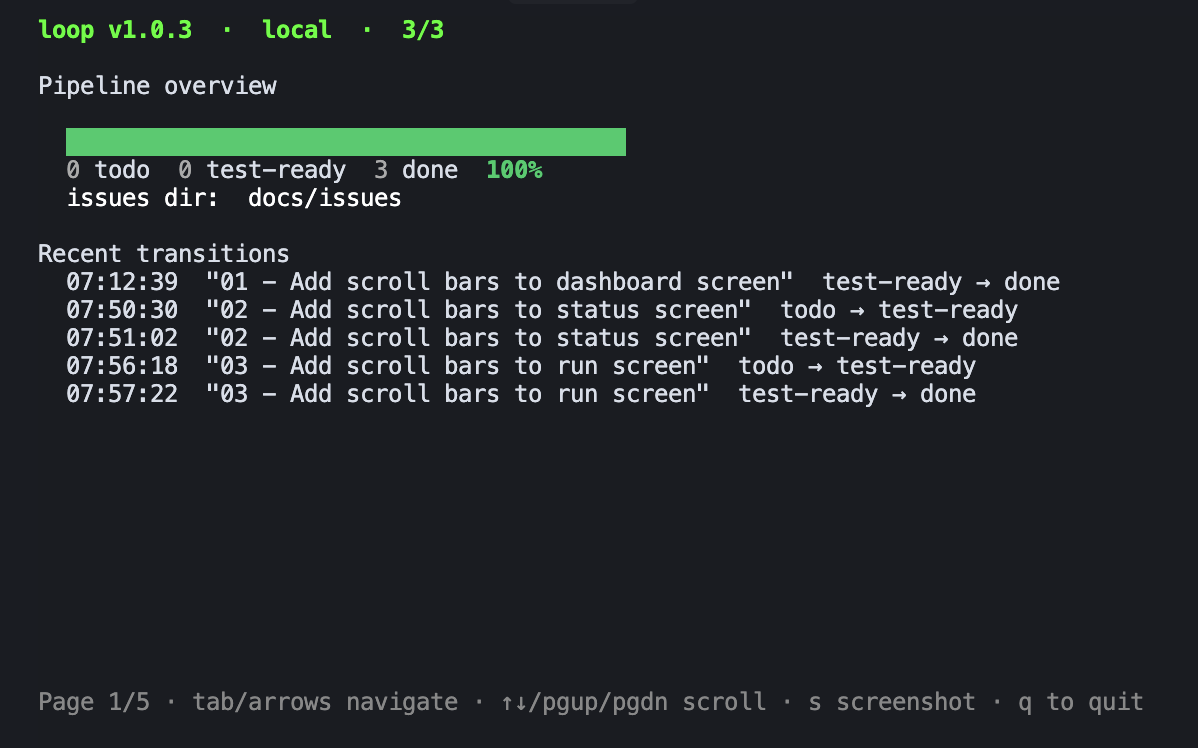
The pipeline bar shows the ratio at a glance. Each stage is a separate page. The s key saves the current view as text — useful for sharing mid-sprint progress.
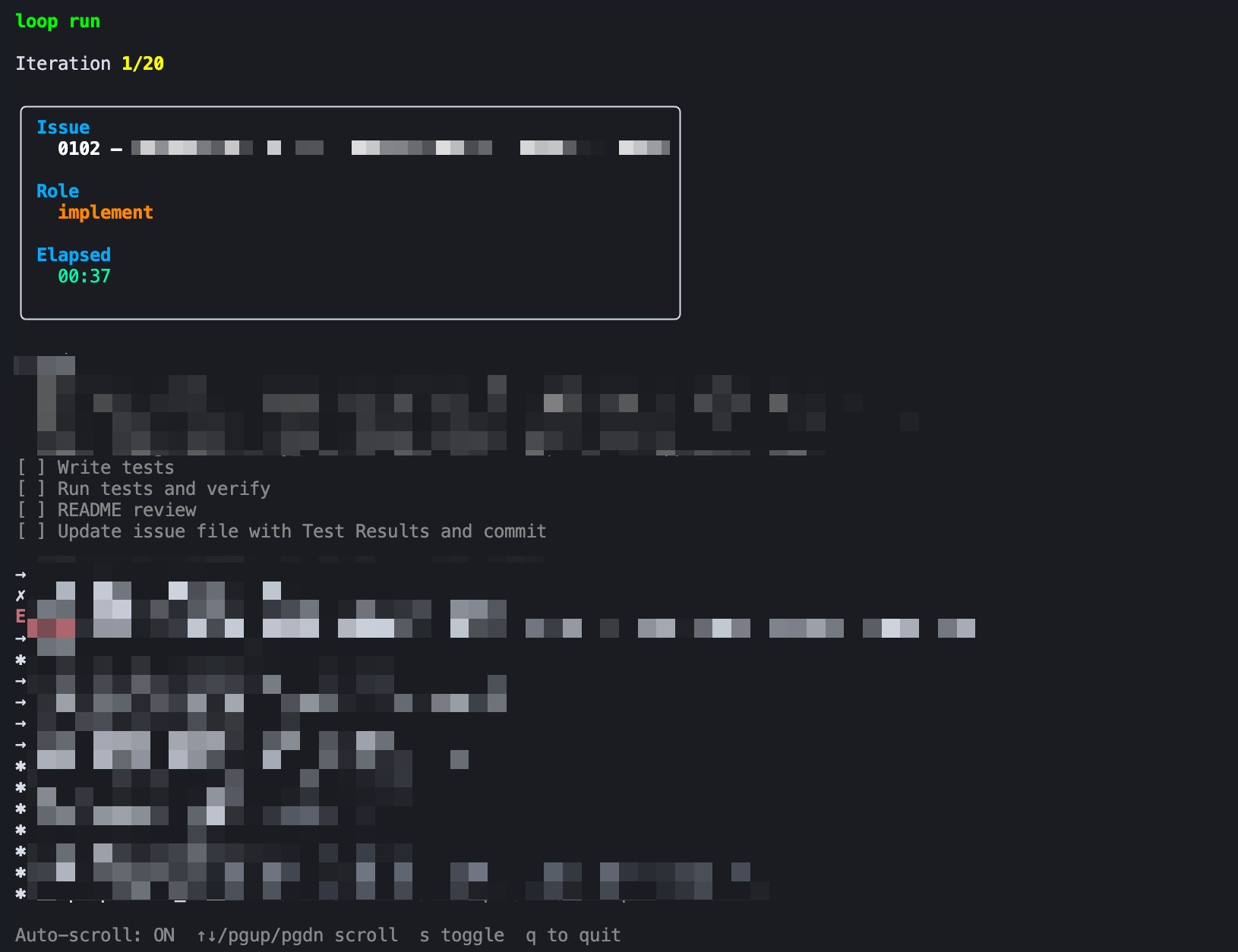
During an iteration, the run view streams everything in real time:
Git Safety
Every iteration is wrapped in git safety:
- Stash dirty working tree
- Create temp branch from target
- Run the agent
- Commit agent’s changes
- Restore original branch, pop stash
On TEST_PASS, the temp branch is fast-forward merged and deleted. On interrupt, loop restore recovers the original context. I’ve killed it mid-run and picked up exactly where I left off.
The Catch
This approach costs more tokens and takes longer than a single-pass loop. Every issue runs through at least two agent invocations (implement + test), and failures trigger full retries. If you’re optimizing for speed or token budget, this isn’t it.
I prefer quality over speed. The feedback loop — implementing, testing, and feeding failures back for another pass — produces better results for me than one-shot attempts. I’ll take the extra time and tokens for fewer broken features downstream.
Why It Matters
Before this, I’d write an issue, run the agent manually, inspect the output, fix things, and repeat. The feedback loop was me.
Now I write issues and come back later. The bottleneck shifted from “can I keep orchestrating this” to “are my issues well-defined.” The AI grinds through the backlog; I just make sure each issue is scoped right.
That’s a much better place to be.
Meta note: loop itself was built using opencode, loop (dogfooding it as it grew), and the deepseek-v4-flash model.